Police Check
CodesAPI credentialType POLICE_CHECKSpreadsheet import npcAll credential codes
A Police Check is different from the registry look-ups elsewhere in this section. Rather than looking up a card someone already holds, Oho submits and obtains the check on your behalf.
A police check is filed here as a credential, because that's how it behaves on a worker's profile: it has a result, an expiry, and a re-check cadence, and it counts towards compliance like any other credential.
It also does the job of a ban check — it surfaces disclosable outcomes that may disqualify someone, rather than confirming a clearance they hold. That's why you'll find it under Credentials but see it discussed alongside ban checks: same record, two purposes.
The distinction that matters in practice is the direction of the answer. On a credential, green means we found their clearance and it's valid. On a ban check, green means we found nothing. A police check's result reads like a credential's — a clear check is a positive finding about the person, not an absence of one.
Who needs it
Workers and applicants in roles that require a criminal-history check. Oho tracks worker police checks and applicant police checks separately, so a check run during recruitment stays distinct from one run for an engaged worker.
What Oho needs
For a new check: the personal details needed to initiate it, including the worker's date of birth. Because the check is submitted rather than looked up, there's no card number to supply.
For a check you already hold from a prior system, there is a reference number — and importing those has two firm requirements.
On the Credentials sheet, use Credential Type npc, leave State blank or set it to AUS, and give the row an Issue Date.
The issue date isn't optional here: the check's expiry is calculated from it, so a row without one is skipped rather than imported. See Spreadsheet columns.
Imported checks are loaded as already-completed and historic. Oho doesn't re-run them and no provider is contacted — the point is to make the worker's record accurate from day one, not to buy a check you've already paid for.
Historical police checks from candidates
When a police check is part of a recruitment check or a fetch request, the candidate can either start a new check or upload a police check they already hold — a historical check, with its reference number, attainment date and certificate. A historical upload isn't re-run with the provider; it goes to review, like an imported check.
You decide how far to accept historical checks under Settings → Manage → Features → Police Check Settings.
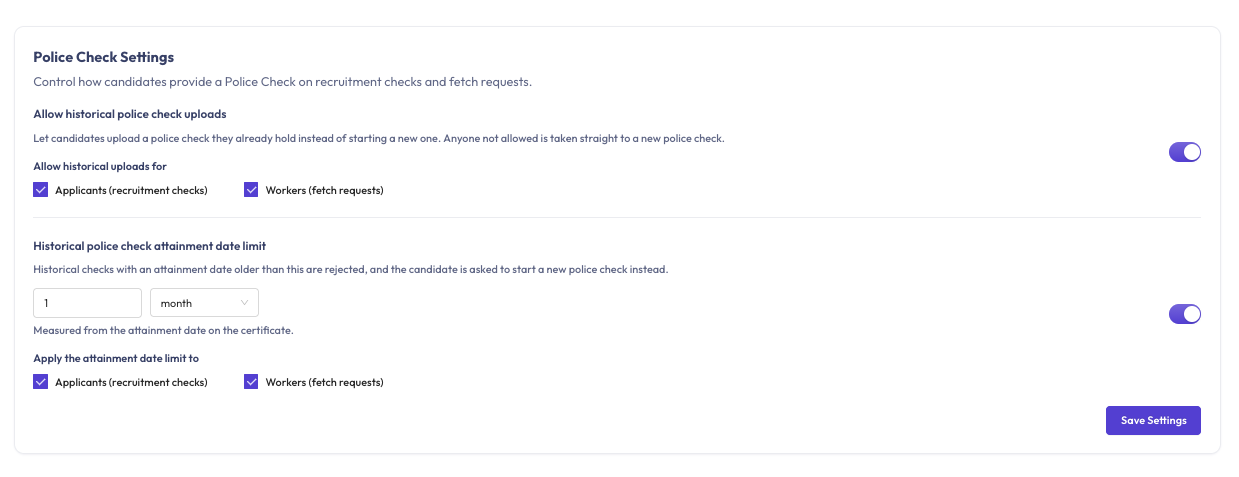
- Allow historical police check uploads — on by default. Under Allow historical uploads for, choose Applicants (recruitment checks), Workers (fetch requests), or both. Anyone not allowed is taken straight to a new police check. Turn the toggle off to require a new check from everyone.
- Historical police check attainment date limit — off by default. Turn it on to accept only historical checks with an attainment date within a set window, for example the last 1 month. Under Apply the attainment date limit to, choose applicants, workers, or both.
The settings take effect as soon as you save, including on requests already sent. Candidates are told the rule on the form: if uploads aren't allowed for them they only see Start a new check, and a check dated before the cut-off is rejected with the exact cut-off date and the option to Start a new check instead.
These rules only apply to candidates on recruitment checks and fetch requests. Importing checks by spreadsheet, requesting a check from the police check queues, and recording an existing check on a worker's profile aren't affected. See Run a police check for the step-by-step.
Which provider runs it
Oho submits to one of two accredited providers, whichever you've set up as a Verification Source:
- National Crime Check (NCC) — you authorise Oho against your own NCC account, and the source names the organisations it covers. A submitted check carries an NCC ID, the same one you'll see in your NCC portal.
- PharmacyID (PID) — no sign-in to authorise; PRM identifies your tenant by an Office Code. A submitted check carries a PID Ref.
You can have both configured. Each source names its provider, you pick the source on the request, and the check goes to that provider. Connect PharmacyID has a side-by-side comparison if you're choosing between them.
A check carries a PID Ref or an NCC ID, never both — so being asked for the wrong identifier means the wrong provider is being discussed.
Before you start
Running new checks needs a provider account, configured as a Verification Source. Police checks also have to be switched on for your organisation before you can add one — getting started with police checks covers what's involved, who pays, and how to ask for it.
Importing historic checks needs nothing beyond the spreadsheet.
How Oho verifies it
The check is submitted to your configured provider and the result comes back showing any disclosable court outcomes. Results usually come back within minutes, though a check that needs manual adjudication can take days.
That variability is normal and is not a fault: a check sitting in progress for a day or two is the provider working, not Oho waiting. Along the way you'll see the provider's own progress wording — Check initiated, Application in progress, Identity verification, Sent to ACIC — because the applicant completes their own identity verification directly with the provider.
Oho's data model has a slot for an International Police Check, and you may see it referred to. It isn't implemented — there's no way to order one today. National Police Checks are the only kind Oho can run.
Reading the result
Every check resolves to one of these outcomes:
| Status (as shown in the app) | Colour | What it means | API value (eligibility) |
|---|---|---|---|
| May engage | Green | Valid and current — the person is cleared for the work. | MAY_ENGAGE |
| May not engage | Red | Not valid — expired, suspended, not found, or a match on a ban register. | MAY_NOT_ENGAGE |
| Under review | Yellow | No decision yet — someone has to read the result and record one. Not a softer kind of pass: the worker counts as non-compliant until they do. | REVIEW_REQUIRED |
| In progress | Blue | Still being checked. | IN_PROGRESS |
| Couldn't verify | Grey | The source couldn't be reached; Oho will try again. | ERROR |
Validity and expiry are tracked separately from that verdict, and the badge always shows the most serious state on record — so these appear instead of one of the five above:
| Status (as shown in the app) | Colour | What it means | API value (statusDetail) |
|---|---|---|---|
| Expiring soon | Yellow | Still valid, but inside your expiry lead time — 30 days by default. Time to get the renewal moving. | EXPIRING_SOON |
| Expired | Red | The expiry date has passed, so the worker is no longer covered. | EXPIRED |
| Conditions to review | Yellow | The register attached a condition or a notation that someone has to read and decide on. | CONDITIONS_TO_REVIEW |
| Pending decision | Blue | The issuing authority has yet to decide on an application. | PENDING_DECISION |
A problem the register reports outright — the clearance revoked, no matching record, a newer card superseding this one — shows under its own name in red or grey, alongside the same statusDetail value. Every one of them is listed in what a check result means.
| What comes back | What Oho shows | Why |
|---|---|---|
| No disclosable court outcomes | May engage | A clear check |
| Disclosable court outcomes | Under review | A person must weigh them against the role — see below |
| The provider declined or couldn't complete it | May not engage | No usable result |
| Submitted, awaiting the provider | In progress | Normal, and can last days |
| Past its expiry | May not engage | The check is too old to rely on |
A police check that returns disclosable court outcomes is Under review, never automatically red. Whether an outcome bears on a particular role is a decision for a person with the context to make it — and often a legal one. Oho's job is to surface it and record who decided what.
When it doesn't verify
| What you see | What it means | What to do |
|---|---|---|
| In progress for a day or more | The provider is adjudicating manually | Normal for police checks. Leave it |
| An imported row didn't import | npc rows are skipped without an Issue Date | Add the issue date and re-import |
| An imported row became a credential, not a check | State was set to something other than AUS or blank | Use AUS or leave it blank so the row routes to the police-check importer |
| A check you imported wasn't re-run | Intended — imported checks are historic and aren't re-submitted | Nothing. Run a fresh check if you need a current one |
| May not engage — couldn't be completed | The provider rejected the submission, often on identity details | Check the worker's name and date of birth against their ID and resubmit |
| Under review on a clear-looking worker | Something disclosable came back | Open the check and read it. Don't clear it without a decision recorded |
Renewals & monitoring
Police checks don't renew — they age. A check is a snapshot of the day it was run, so what matters is its expiry rather than any status change on a register.
Police checks aren't polled on a schedule the way the live registers are. There's no register to ask — a completed check doesn't change — so what Oho watches is the expiry, through the expiry ladder.
Results for checks still in flight are reconciled with the provider when a run is triggered, rather than continuously.
When a check does expire, a new one has to be run and paid for. That makes police checks the credential worth setting your expiry warnings widest on — see How monitoring works for widening the thresholds.
Related
- Credentials overview
- Ban Checks — the other framing of this check
- National Crime Check
- PharmacyID
- Run a police check
- How monitoring works